CalCOFI uses a variety of analytical instruments to measure our oceanographic samples. Many, such as the Turner Designs 10AU fluorometer, have a RS232 serial interface that can output measurements electronically during sample analysis. This white paper will outline basic RS232 serial communication data logging techniques using a PC. This basic interface strategy should be platform-independent but all examples will be MS Windows based.
Basics terminology
-
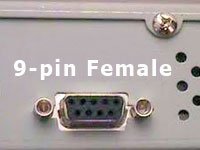
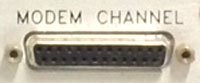
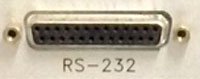
RS232 = com port = serial port - typically a 9-pin port on computer or instrument. May be 25-pins on instruments but do not confused it with 25-pin LPT port. Seabird
Electronics CTD Deck Unit has two 25-pin female RS232 ports, for example. PCs, particularly older desktops, typically have a 9-pin male com port.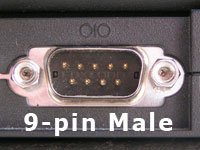
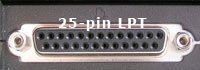
- LPT = parallel port - these terms are used interchangably and refer to a 25-pin parallel printer port on a computer or instrument.
- com = comm, you may see com port written as comm port or com program written as comm program - same thing.
- handshake - phrase used to describe the syncing of communications established between PC & instrument.
- com settings = parameters configured on the PC & in the com program to handshake and collect data from the instrument or serial device.
- com program - PC software needed to 'talk & listen' to the instrument using the com ports.
- sail or stream mode - once configured to output data, some instruments stream data out of the serial port and do not require any commands from the PC. Turner Design fluorometer for example.
- query = command sent by the com program; some instruments require a command be sent by the PC before data is sent out the serial port.
- USB-to-serial device - newer computers and laptops do not have a com port so a USB-to-Serial adapter is require to create a 'virtual serial port'. They come in a variety of configurations such as single, two, or four com ports. A software driver needs to be installed to create the 'virtual serial port(s)'.
Many instruments come with sophisticated software to control the analytical processes. Hopefully, the software is included with the instrument and is not an expensive add-on. Depending on the complexity of the analysis, there may be no alternative to the manufacturer's software. Especially if the instrument is software-driven or visualization tools are needed during the assay. But if the analytical instrument has a serial port, it may be possible to easily capture the output to a text file and import into a spreadsheet or programming language.
Hardware requirements
- Instrument that output serial data - refer to instrument documentation for specifics on achieving this such as the com port settings needed to handshake with the PC. Some instrument require the serial port output to be 'turned on' or configured; once configured, some will stream (often called 'sail-mode') data, other instruments may require a query or command to be sent before it will reply. The Guildline Portasal salinometer requires a query be sent by the PC before sending measurement data back.
-
Computer with a RS232 9-pin port or USB port (in these examples, one running Microsoft Windows XP-8.1)
- USB-to-Serial adapter, if your pc does not have a 9-pin RS232 port. Note there are two typical chipsets: Prolific and FTDI; when choosing an adapter be sure a driver is available for your operating system. We prefer FTDI which has better drivers and specs. FTDI chipsets will work well with Mac or Linux computers. (Google FTDI vs Prolific for comparison info). Prolific are often cheaper and will work with Windows.
-
9-pin null modem cable or 9-pin straight-through serial cable & null modem adapter. Note: some instruments may already have an integrated serial cable, like the Turner Design 10AU fluorometer.
- Length - typically a 10ft (3m) cable is long enough but it depends on the instrument port location & distance to pc serial port. A serial signal can travel ~50-100ft (15-30m) depending on the cable and signal quality. If you add a serial signal repeater/booster, the signal may travel up to 4000ft. (1200m).
- Gender of each connector is determined by the computer and instrument serial port gender. On the computer-side, you typically need a female (F) cable connection. The instrument end may also require a female (F) connector so you would use a F-F 10ft serial cable. A small gender changer may be used to adapt incompatible ends.
- Most instruments need a null modem to handshake properly but it is good to have a 9-pin straight-through non-null modem serial cable as well. You can use a null modem adapter (looks like a long gender changer) on a straight-through serial cable to create a null modem cable.
- 25-pin port - LPT or RS232? It is rare for newer instruments to have a 25-pin serial port - typically a 25-pin is a parallel (lpt) printer port. Check the instrument documentation if the port is not labled or you are unsure. If you see a "LPT" label, the port is for a parallel printer; if you see "RS232 or Modem" label, the port is a serial port. Do not connect a 25-pin parallel port to 9-pin serial port. If you are sure it is a 25-pin RS232 serial port, you can use a 25-pin to 9-pin cable. A null modem adapter may still be required.
-
Com program - some versions of Windows come with Hyper-terminal but we prefer Tera Term freeware. Tera Term and Hyperterminal have a log-to-file feature so any data displayed on screen can be saved to a log file.
- com port settings - in your com program, configure the settings to match the instrument. Check the instrument manual for com port settings - you will typically see something like "9600, n, 8, 1". If data appear on-screen but it is garbage, try a different baud rate such as 19200 or 4800, until you see legible text.
- when using a USB-to-Serial adapter, you may have to search the 'Windows Device Manager' for the com port number. Open 'Windows Device Manager' and look for 'Ports (Com & LPT)'. If the USB-to-Serial adapter is attached to your PC and the driver properly installed, you should see it listed. The 'COM#' next to the device name is its current com port number. The other parameters can be configured by the com program but you need this value - mine reads 'COM4', for example. If necessary, you can change this value by right-clicking the device, select Properties, Port Settings, Advanced, COM Port Setting - select the com port number you want then OK. Please be aware that this custom setting may not be saved after rebooting; when you turn off or reboot your computer, it may switch back to the original setting. If this happens, you will have to repeat these steps. The FTDI driver is better at saving setting changes.
Once you see data and can save it to a text file, you are recording your instrument's output. Importing these data into Excel or writing a parsing routine in Matlab would be the next step.
You can test your serial data collection setup by attaching a serial device like a GPS to your PC. If you are successful at seeing and logging its data, the setup should work on any instrument that outputs data. Just be sure to configure the com settings properly.