There are two version of CELogGPS - the newest version of CELogGPS uses a touch-screen PC or tablet with very little (virtual) keyboard interaction and a plainer version which also requires little key-entry once configured. But the user-interface is not as graphical or touch-friendly.
This web page describes the configuration and operation of the original version of CELogGPS that is configured by a variety of text files (.txt). This version can also be used on a touch-screen tablet but is not optimized for that style of input.
CELogGPS (CELogGPS1806.exe; download link) is a SIO-CalCOFI Windows program that records cruise events and activities timestamped with GPS date-time-lat-lon. Other notable events such as marine mammal-avifauna sightings, CUFES, or any data-generating activity may also be recorded. The GPS position is either logged directly into the PC running the program or is available on a shared network directory:
-
Obsolete - The MET string is still an option as a GPS source but CalCOFI does not run METCapture on its cruises anymore.
On SIO vessels, the MET (meterological system) string provides GPS data. A workstation is setup to run MetCapture, another SIO-CalCOFI program, that collects the MET data and appends event numbers when updated. METCapture saves the current MET string (with GPS date-time-lat-lon) to a file (currpos.csv) on the shipboard data network that all eventlogging workstations can harvest. Please review the METCapture documentation for more info. (Standard GPS input is acceptable; METCapture can log GPS instead of MET data or the GPS feed may be connected directly to the CELogGPS tablet serial port.) - GPS via com port is expected in some form, either from a ship feed or a USB GPS attached directly to the CELogGPS computer or tablet. One PC can provide the GPS data (currpos.csv) to a networked data server shared directory and other eventloggers on the same network can harvest the GPS position. See the GPS settings section below for setup information. We currently use model: GlobalSat BU-354 USB GPS Receiver with SiRF Star IV based Serial GPS receiver with WAAS/EGNOS support for enchance position accuracy when a ship GPS serial feed is unavailable.
Setup & Configuration
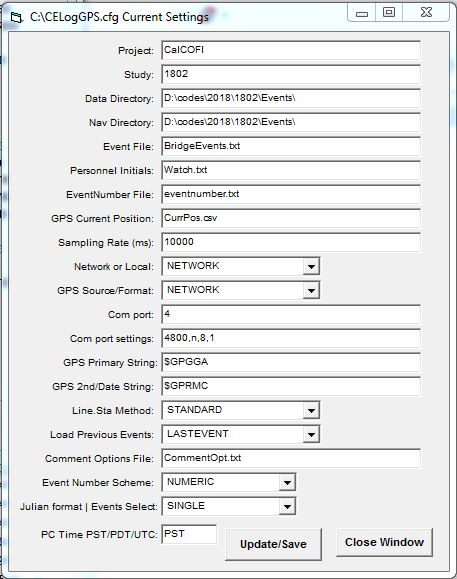 The events list & form options are configured by text files defined in the CELogGPS.cfg, which may be edited from the Config/Edit CELog.cfg menu (see figure):
- Project - cruise name such as CalCOFI or LTER Process
- Study - YYMM for CalCOFI (ie 1802) or unique cruise designation for non-CalCOFI cruises. The program works best with YYMM.
- Data Directory - location where the data will be saved. On CalCOFI it is in the events dir (Q:\CODES\YYYY\YYMM\Events).
- Nav Directory - location of the GPS Current Position file (see GPS cfg below, ie currpos.csv) either GPS or MET string; see GPS Source and GPS primary & secondary strings explained below.
- Event File - A text file listing up to 30 events can be composed for any activities generating data on the cruise. Different workstations can have different activities lists; each workstation will save an YYMMevents.csv locally and contribute to the cruise's master activities.csv. Use unique names for each different events list ie LabEvents.txt, BridgeEvents.txt, MarineMammal.txt, InstrumentEvents.txt.
- Personnel Initials - a text file with one set of intials per line for each event logger ie watch.txt. Different workstations can have different initial files since the watch.txt file is stored and accessed locally.
-
EventNumber File - a text file containing a chronological, incrementing number which all event loggers on the shipboard data network share & contribute (increment) ie eventnumber.txt. If Event Number Scheme is set to Julian, then chronological event number are not used. The Julian format is Julian Day-of-the-Year+local time (ie 218:1102 if Julian format is set to Single or Short; to include seconds set Julian Format to Long).
The Julian Event Numbering is useful when multiple copies of CELogGPS are run on independent computers. Julian event numbering should generate unique event numbers so individual event logs could be merged into a single cruise event log then sorted chronologically. - GPS Current Position - GPS data source file name ie currpos.csv - note that straight GPS output is not csv but the filename extension is, regardless. Please refer to the GPS Source/Format section for format information.
- Sampling Rate (ms) - 15000 ms = 15 secs, the frequency which CELogGPS queries the GPS Current Position file (currpos.csv) and EventNumber file (eventnumber.txt) for new values. If you are having "file not found" issues then make this value longer ie 30000 (30 secs) or check network connectivity. If GPS is harvested off a networked dir, be sure the shared networked dir is mapped to a drive letter (ie Q:\) set in the cfg (Nav Directory) & the dir shows up in Windows File Explorer.
- Network or Local - toggle for LOCAL or NETWORK connectivity. NETWORK is the default since the GPS Position File (currpos.csv) & Eventnumber file (eventnumber.txt) are typically shared on the shipboard data network. Change to LOCAL when the network is unavailable, the event log is used independently, or the GPS is being logged & shared by the local workstation.
-
GPS Source/Format - although GPS is pretty standard, sometimes it is necessary to distiguish different ships or sources:
- NETWORK - CELogGPS will look to a shared, mapped network drive/directory (ie E:\ or Q:\CODES\2018\1802\Events\ on CalCOFI cruises) for the GPS Position File (currpos.csv).
- GPS - a GPS is attached locally; this workstation can act as host & copy its GPS Position File (currpos.csv) to a shared, mapped drive/directory. When set to GPS, the GPS com port setting dialog will display - refer to the GPS settings section for setup information.
- MET - same as GPS but the GPS Position FIle (currpos.csv) is in MET-format.
- SCS - the GPS Position File (currpos.csv) is in in NOAA SCS-format; this option may need additional programming since it has not been used for years.
- UDP - requires a UDP virtual serial port driver and GPS feed via UDP over ethernet; may require programming tweaks to work.
- KNORR - same as UDP, requires a UDP virtual serial port driver and GPS feed via UDP over ethernet; used on an early LTER Process cruises & may require programming tweaks to work.
- JD - obsolete, RV David Starr Jordan NOAA bridge log GPS format
- Com Port - for a direct GPS connection; # of the com port the GPS is connected (ie 2); note: that the com port # assigned when using a serial to usb adapter may change whenever reinstalled. Check the Windows Device Manager (under Control Panel) for current address, remap or reconfigure as needed. If set correctly, the GPS feed will display in the GPS window.
- Com post settings - usually 4800, n, 8, 1 for USB GPS
- GPS Primary String - GPS string used for Lat & Lon; currpos.csv must contain this header ie $GPGGA. Other headers in the currpos.csv are ignored except the GPS 2nd/Date String (see next). If the GPS lat lon fields are incorrect, check the GPS feed is working and what strings are available.
- GPS 2nd/Date String - GPS string used for GPS Date & Time; currpos.csv must contain this header ie $GPRMC. If the GPS date time fields are incorrect, check the GPS feed is working and what strings are available.
-
Line.Sta Method - CalCOFI line and station data can be determined three ways:
- STANDARD - using latitude-longitude, Line & Sta are calculated and compared to the standard line.sta table. The nearest standard line.sta numbers are entered in the form & data file. Note: the calculated Line & Sta are also saved to the events.csv.
- CALCULATE - using latitude-longitude, Line & Sta are calculated and the calculated line.sta are recorded; useful for non-CalCOFI cruises in the CalCOFI grid
- SELECT - Line and Station are selected manually by the user from the Lines.txt file.
-
Load Previous Events - when restarting CELogGPS, how many previous entries to reload
- CURRENTSTA - will reload all the current station's logged events
- LASTEVENT - will reload just the single record of the last event recorded
- ALLEVENTS - will reload the entire cruise events log
- LASTSTA - will reload all the last station's events; default setting
- Comment Options File - the three options boxes typically Station Type, Sea Conditions, Day/Night are configured by text file listed here ie CommentOpt.txt.
-
Event Number Scheme - to create unique event number IDs or indexes for a cruise, chronological or Julian numbering can be used.
-
NUMERIC (default) will set the event number as numeric and chronological ie 001, 002, 003...
-
JULIAN is used for standalone loggers on the same cruise that are not networked, not using a shared eventnumber.txt file. If JULIAN is selected, the next field Julian format's LONG or SHORT affects the length of Julian time recorded as the event number.
-
SHORT result in DOY.HHMM, which is Julian Day of the year, with Jan 1st = 1; Dec 31st = 365; HHMM current time in hour & minutes.
-
LONG adds seconds to Julian Time so the event format becomes DOY.HHMMSS. LONG is used if cruise events may occur at the same time on a minute-scale so need to be resolved by seconds.
-
-
-
Julian format | Events Select - this option contains two separate feature options (which should be separate - next version perhaps). Julian format is described in the last entry JULIAN. LONG or SHORT affects the timestamp length. Completely separate (and almost forgotten) is the MULTI or SINGLE option added quickly for the Marine Mammal users.
-
MULTI - will convert the events selection list on the right to checkboxes. This allows more than one selection to be recorded - events will combine/append in the order of selection. Marime mammal observers created a sightings event list so events could be a combination of selected options.
-
SINGLE - default - only one event is selected at a time.
-
-
PC Time PST/PDT/UTC - CalCOFI logs all data collected & events on Pacific Standard Time (PST). Computers that run CELogGPS may be set to PDT or UTC so this setting applies a time offset automatically without changing the computer's clock. All CalCOFI data acquisition computers are set to PST all year long but we often run CELogGPS on the shipboard CTD data acquistion computers. On RV Sally Ride, all the data acquistion computers are set to UTC; on other ships, depending on time of the year, computers may be set to PDT. This option will apply an offset to the event time based on the setting - if NO correction is desired, set this to PST.
Notes - these options are easily changed using the Config menu in the upper left.
Three files are required by CELogGPS and usually reside in the shared, mapped network Events dir: currpos.csv, eventnumber.txt, orderocc.txt. OrderOcc.txt increments automatically when the Station Arrival event is recorded. OrderOcc's numbering can be off if Station Arrival is not recorded or recorded too many times.
Operation
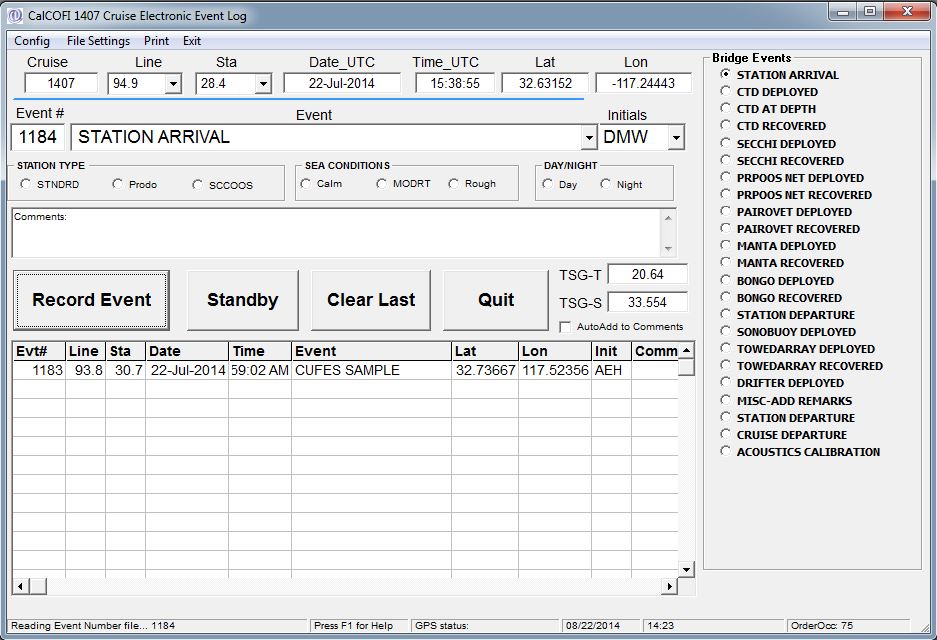 Once configured, CELogGPS requires very little keyboard interaction. Event selection may be done from the list by stylus, mouse, or trackball. Once an event is recorded, the cursor automatically moves down to the next event on the list and is selected ie after CTD DEPLOYED is recorded, CTD AT DEPTH is auto-selected as the next event. Compose your events list to use this feature to simplify the event selection process and be aware the cursor will move automatically. Our events list is composed with a typical CalCOFI station sequence in mind: STATION ARRIVAL, CTD, secchi, vertical nets, towed nets, and misc other data-generating activities.
- Click [START] to begin - the GPS fields should fill and update every 15 seconds (depends on GPS or MET update frequency).
- Select an event then click [RECORD EVENT]; only one event may be selected from the list at a time unless the MULTI option is selected when configuring CELogGPS or Config/Checkbox mode is selected in the menu.
- Any event may be key-entered into the Event field by selecting it then typing. Using a static list helps standardize vocabulary but custom entries may be key-entered at anytime. Especially for rare events such as whale, market or Humboldt squid encounters.
- [STANDBY] - CELogGPS monitors the currpos.csv and eventnumber.csv files every 15 seconds. STANDBY will PAUSE the continual querying of those files until RESUME is clicked.
- [CLEAR LAST] - will remove the previous entry from the screen and place an "erase last entry" comment into the events data file. Whenever an incorrect event entry is recorded, use this button to remove it, then select and record the correct event using [RECORD EVENT].
- Options Station Type, Sea Conditions, and Day/Night are available to streamline entry of general comments often observed, minimizing the use of keyboard. When the options are selected, they are automatically entered into the Comments box. Additional comments are welcome - select the comments field and key-enter any relevant comments using the keyboard.
General Notes
At the bottom of the CELogGPS form are several fields (from left to right): comments-status, F1 for Help (needs work), GPS Status, Date PST, Time PST, Order Occ.
Please record all events possible even if they are well after the actual event time. It is useful to annotate "late-entry" into the comments field to identify late events so date-time & lat-lon can be corrected from log sheets or other sources when available. The main purpose of the event number is to assign a unique identifier to data generating activities on a cruise. It also functions as a cruise journal, highlighting sequences of activities, recording unique or rare events, and to record time & position of general cruise events.
CELogGPS saves the events in a couple ways - locally in the C:\CELogGPS dir - it saves an event-specific csv such as YYMMStationEvents.csv. It also contributes to the shipboard data network master events file YYMMEvents.csv. CELogGPS also saves a html version of the events file since opening the events csv in Excel will lock the file, making new entries impossible and the program crash. So if you must open the events.csv, copy it locally and open it on your own workstation. Do not open the shared network version.
The CELogGPS screen should display all events recorded by any networked event logger - this is useful in situations like if Aft Control forgets to do a CTD AT DEPTH event, the CTD operator can see the event is missing & record one.
Other features -
- double-clicking the Events frame title will open the events editor, allowing event editing or new entries.
- Events are recorded to the data file right away - the file is open, entry written, file closed so erasing an incorrect entry has to be done manually after the cruise.
- Under the File Settings menu, the location and filename of the OrderOcc File, EventNumber File, Position File are available for verification.
Latest Changes
v1711 - added a PC Time PST/PDT/UTC offset option
v1407 - added MET TSG Temperature & Salinity display to the activities form. These were added for the CUFES personnel to key-enter those values when their MET feed was not working. When checked, the 'autofill to Comments' will add these two values to the eventlog event comments field.