CESL (pronounced Cecil, after the sea-sick sea serpent cartoon character  ) is CalCOFI's Electronic Sample Log, which replaces the traditional clipboard and sample log form.
BASICS
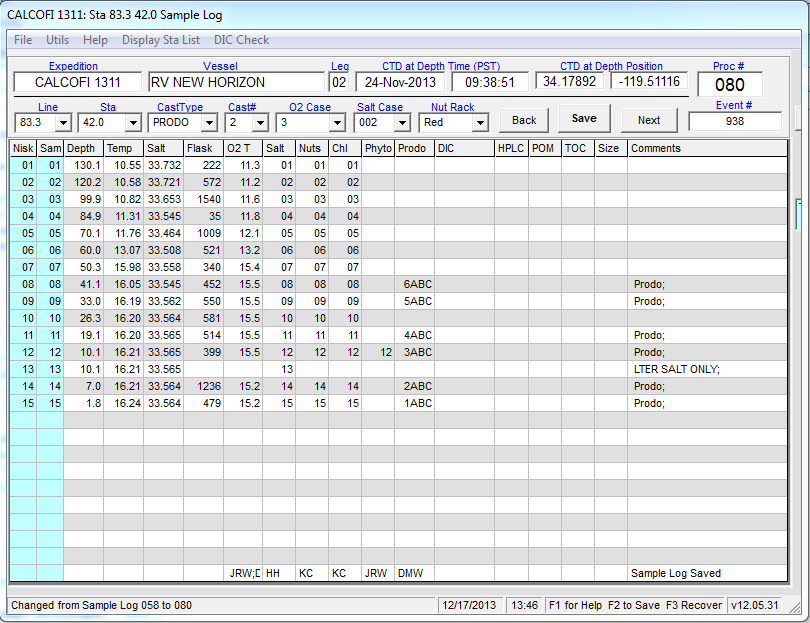 CESL auto-loads the bottle depth information from a base file created by the CTDBackup program from the CTD cast files. CTDBackup uses the .mrk & .hdr files plus CTDATDEPTH event (.csv created by CELogGPS) to build the CTD cast's seawater sampling scheme that fills the form. This is a live, dynamic document that the watchleader should check, edit, comment, annotate, & revise to accurately log all seawater samples taken plus any sampling notes or issues.
Important note: the .mrk file must accurately report the bottle closures - if any extra markers were generated or markers missed then the .mrk file should be edited before CTDBackup is run. Refer to CTDBackup for additional info.
CESL expects station numbering to be consecutive (001, 002, 003...) and requires a base file generated by the CTDBackup (<Ctrl><Alt>B) program. If a base file is unavailable, the station cast info may be entered manually (line.sta, order occ, total # of bottles closed) then the sample log completed & saved normally.
O2 case, salt case, and nutrient rack color are selected from the drop-down boxes by the watchleader or sampling team.
Bottle options, such as LTER Salt Only or MISTRIP, may be selected for a bottle by double-clicking the niskin or sample number at a particular depth then selecting from the pop-up list (see the alternate bottle section below). Once all seawater samples are drawn, sample drawers initials added, and all fields checked for correctness, click [Save] (or menu File/Save Everything or <Ctrl>S). This will save & print the log for station bookkeeping, generate the individual sample assay files (Salt, O2, Chl) , & generate data processing csvs.
[Save] does the following:
-
 Sample form is saved to the data server (Q:\CODES\YYYY\YYMM\logs\YYMM###slog.csv) & printed to the default printer (SIO-CalCOFI laser printer). The sample form may be reloaded into CESL anytime by entering in the processing number. Corrections, annotations, &/or revisions done then resaved/reprinted.
 - Oxygen box file - an O2 box file (O:\###02) that will preload the O2 flask number and draw temperature into the autotitrator program is created and copied to the oxygen titration computer. The O2 computer must be networked & mapped to a drive letter (usually O:\) so CESL can copy a the box files to the autotitrator's box subdir.
- Salt base file - a salt base file (Q:\CODES\YYYY\YYMM\Salt\Salt###) is saved to the data server for use by the PSAL salinity analysis program.
- Chl base file & filtration form - a chlorophyll base file (Q:\CODES\YYYY\YYMM\Chl\Chlt###) is saved to the data server for use by the FLog chlorophyll analysis program. Using MS Excel, CESL pre-fills a chlorophyll filtration form with chl vial numbers (starting vial # comes from CESL.cfg), filter-time (CTD cast time +1 hr) and operator (1st O2 initials), and fluorometer (from CESL.cfg).
- CESL generates the sta.csv & casts.csv entry for each station during the [Save] process. The sta.csv (YYMM###.csv) will be populated with CESL's (.mrk file) depth, temperature, salinity, annotations, footnotes, and comments. CESL's station information plus processing and event numbers will save into the YYMMcasts.csv. The sta.csv and casts.csv are the primary data files used during data processing so it is critical the watchleader verify the information before saving especially order occupied, line.sta, date-time-lat-lon, event number, and sample numbering.
YYYY = year; YYMM = year month cruise designation; ### = order occupied
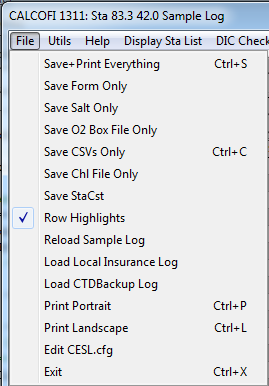
Note: any step of the log or file saving sequence may be performed separately by using the menu File options - see image.
Oxygen samples draw temperatures may be entered surface to deep by first double-clicking the surface bottle O2 draw temp cell. CESL will ask if you want to enter temperatures in reverse order - click YES. (This method is preferred over having CTDBackup fill the form in reverse order, surface bottle at row 1). When entering the O2 draw temperatures, the decimal is not required if <Enter> is hit instead of mouse-clicking. Also when <Enter> is hit, the draw temp plus other depth info is saved into an insurance file which can be reloaded if the program crashes by pressing <F3>.
If the salt or nutrient samples are continuing a case or rack, enter the starting sample bottle number in row 1 (of the salt or nut field) then hit <Enter>. You will be prompted to renumber the rest of the column automatically.
Double-clicking a comments field will bring up the comments editor. Please use a semi-colon as text separator since the saved form is comma-delimited. This rule applies to any cell where entries are delimited (e.g. initials, DIC bottles).
SETUP
CESL is a SIO-CalCOFI developed Windows program. CESL's default directory is pre-programmed to C:\CESL; data files can be located locally or on a networked drive.
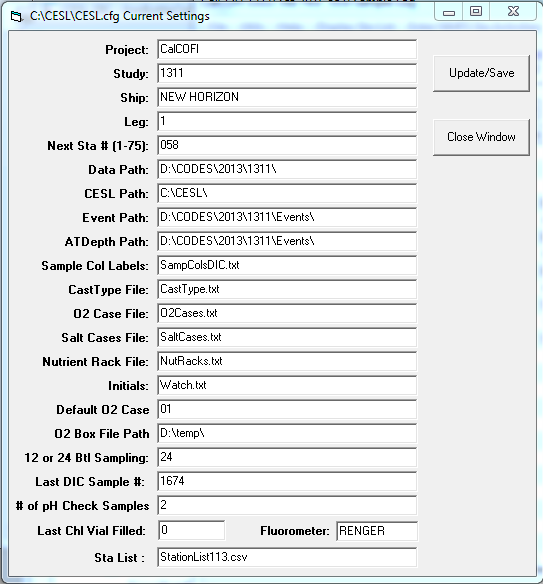 The cfg fields are pretty self-explanatory - the settings that typically change are year YYYY and year-month YYMM in the data & file paths & Study field. These values and drive path are critical for successful networking of the SIO-CalCOFI software network.
Description:
- Project - always CalCOFI during CalCOFI cruises; LTER or CCE-Process cruises or other project names are accepted
- Study - YYMM (such as 1401) is critical for CESL to generate daughter files that other analytical programs can use.
- Ship - general field although reserved names (NEW HORIZON, REVELLE, SHIMADA) will generate shipcodes
- Leg - whenever personnel responsible for data collection changes (embarks/disembarks), the leg should increment
- Next Sta - next chronological station base log (YYMM###.log) will load. If not found, the form will reset but not pre-fill. To enter an old or non-consecutive log, key-enter the number into the main form Proc # field.
- Data Path - is critical, setting the reference base dir for all data types
- CESL Path - although CESL is usually in the C:\CESL\ dir, only the CESL.cfg file needs to be located there if this path is set to another drive or directory. This has not been thoroughly tested so using C:\CESL for the program & support files is highly recommended.
- Event Path - the dir where the cruise events are saved, usually Q:\CODES\YYYY\YYMM\Events\
- ATDepth Path - the dir where the CTDATDEPTH event is saved, usually Q:\CODES\YYYY\YYMM\Events\
- Sample Col Labels - sets the sample form's column headers. Although variable, certain routines are pre-programmed to use specific columns. The 4 columns left of DIC are available for different sample logging.
- CastType File - loads the choices in the CastType drop-down box, usually ROS, PRODO, SCCOOS, and ANCILLARY. This field is flexible but certain reserve cast types like PRODO will try to load the prd### file, highlighting and prelabeling the prodo sample depth (when the file is available and numbered properly).
-
O2 Case File - this file lists the O2 cases that are prefilled into the O2 drop-down case selection field; when a cont'd case is selected, the user will be prompted for the first flask number. This is used when oxygens from more than one station are drawn into one case, common on shallow or SCCOOS stations where only 4 samples may be drawn.
Important note: when an O2 case ## is selected, the flask numbers are preloaded into the flask column from the O2Case##.txt file (in the CESL default dir). These values should be checked for correctness - if flasks are out of order, please change the value on the form then double-click the column header to save the change to the O2 case file or manually edit the O2case##.txt file. Remember to copy this new case file to the CESL archive directory on the data server, replacing the incorrect older file. - Salt Case File - this file populates the salt case drop-down box so salt case ### may be selected, this is saved to the salt base file.
- Nutrient Rack File - populates the nutrient rack drop-down so the right color rack can be selected
-
Initials - the file fills the list of initials available when double-clicking the sample drawers initials field at the bottom of each sample column. New people should be added; try to use three initials when possible so duplicates are easier to avoid.
Note: when multiple initials are selected for one sample type, they will fill the field in list order. This only concerns the chl filtration form which uses the first set of initials as chl filterer. To workaround this, select the O2 drawer who will filter chls then key-enter any other initials; or cross-out the initials on the chl form and write-in the correct intials. - Default O2 Case - sets the default O2 case to list in the O2 case drop-down box
- O2 Box File Path - is critical for the oxygen autotitrator base file values be available during the oxygen analyses. The O2 computer hard drive must be mapped to a letter, usually O:, on the CESL computer. The connectivity needs to be verified so copy a dummy file from CESL to ROxy (or whichever pc is used for O2s).
-
12 or 24 Btl Sampling - when set to 24, the typical CalCOFI seawater sampling scheme is used; when set to 12, for northern lines on winter & spring cruises, the form to expect only surface and deep salt samples, no nutrients, and 12 bottles for O2s.
Important note: the CTD carousel sampling should be set to table-driven and bottles tape-labeled 1 -12 to improve the sampling success of every other bottle. Tripping every other bottle also evens out the load. - Last DIC Sample # - if set correctly, the DIC sample fields can be auto-numbered by just double-clicking the appropriate depth
- # of pH Check Samples - will add pH samples to the sample log; not fully developed so ignore.
- Last Chl Vial Filled - is a critical value for chlorophyll vial auto-numbering, check for correctness if multiple attempts to print the chl form is necessary.
- Fluorometer - the fluorometer named here will be pre-filled into the chl filtration form, usually RENGER.
- Sta List - recently added menu bar selection will display a station list to aide in prefilling labels for the next station - handy when SCCOOS is next and the number is not remembered.
General Operational Notes:
- CESL's header information comes from CTDBackup's ingestion of CTDATDEPTH event. If the CTDATDEPTH event is not available then CTDBackup uses the .nav & .hdr files to generate the date, time, lat-lon, station, order occ information. These fields should always be checked for correctness.
- The Line and Station manual selection drop-down boxes are populated by the Line###.txt files.
- If a prodo station is mis-labeled in the .hdr as something other than PRODO, the prd### file will not be read and prodo depths not highlighted. BUT selecting PRODO in CESL's CastType box will try loading the prd###. Remember it is critical that the order occ ### (prd###) and bottle numbers be set properly in the DECODR PIC module.
ALTERNATE BOTTLE SAMPLING CHOICES
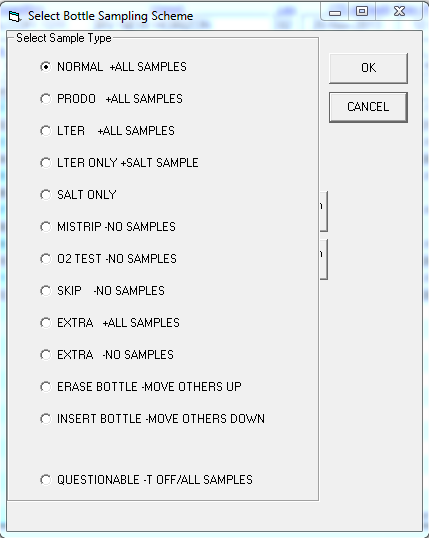 When Niskin or Sample fields are double-clicked, the alternate bottle sampling selection dialog box appears. Based on the users choice, the sampling fields for the selected depth are modified and the description of the selected sampling scheme lists how the it will be modified. Typical changes are: MISTRIP, no samples which blanks the seawater sample fields; LTER ONLY, will blank all columns except the salt sample; O2 TEST, SKIP, or EXTRA which blanks all seawater sample fields since the bottle is a duplicate and will be used for ancillary purposes.